June 2026
How I Built a Strava for My Dog's Walks
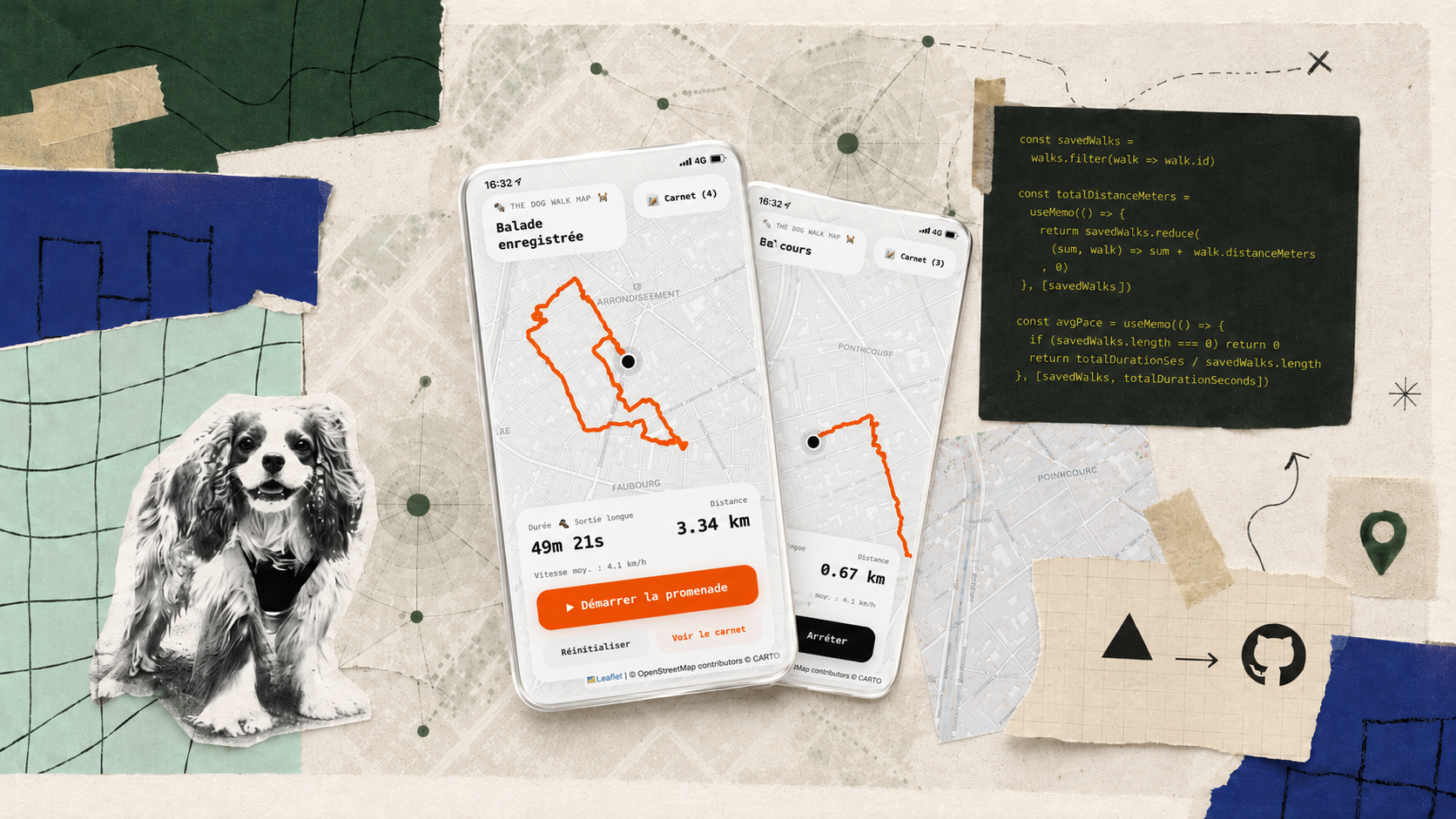
I have a dog, and I have to admit something.
Most walks are astonishingly boring.
Every dog owner will recognize this with a touch of shame: walking a dog mostly means mechanically following a route you've done hundreds of times. The same street, the same park, the same sidewalk, then the way back…
Not necessarily because it's the best possible walk. Simply because the route checks three boxes: it's convenient, it's familiar, and it requires no thought.
While walking my dog Hubert through the streets of Paris, I started to think he deserved a little more than that. So I made an effort to vary our routes, and I began exploring new streets, new paths, new itineraries…
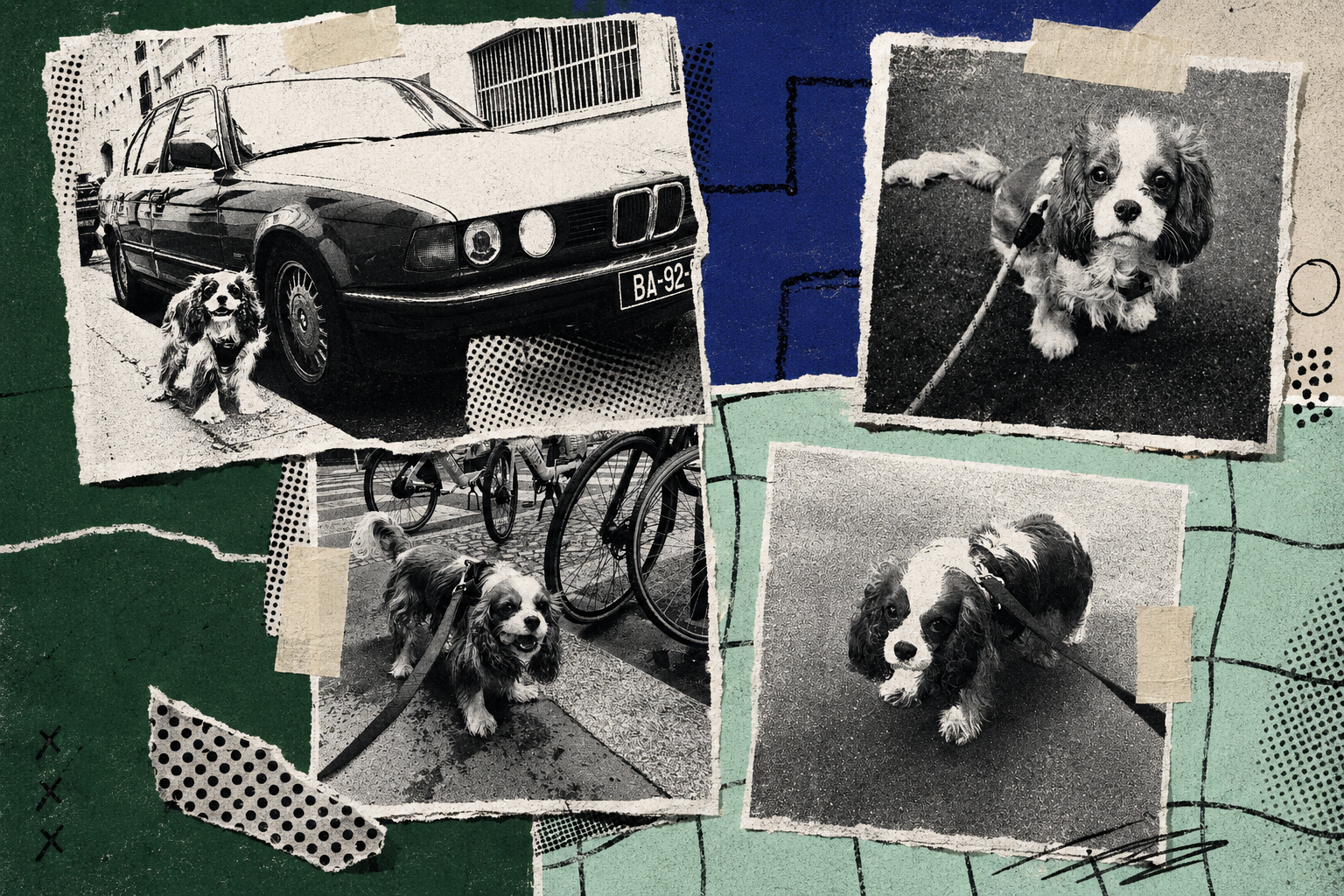
Hubert. Not Uber. © ML
Once this new routine took hold, I wondered how I could keep track of these explorations. I wanted to analyze all sorts of data: Which streets did we take? Which route do we take most often? How long are our walks, on average? What was our pace? How far did we go? Not to turn our walks into a performance, but to better observe our habits.
Fitness apps have established a model in which physical and geographic movement can be turned into structured records. Yet neither my step counter nor my Strava could log data specific to Hubert's walks. And a dog walk relies on exactly the same signals: movement, pace, duration, route…
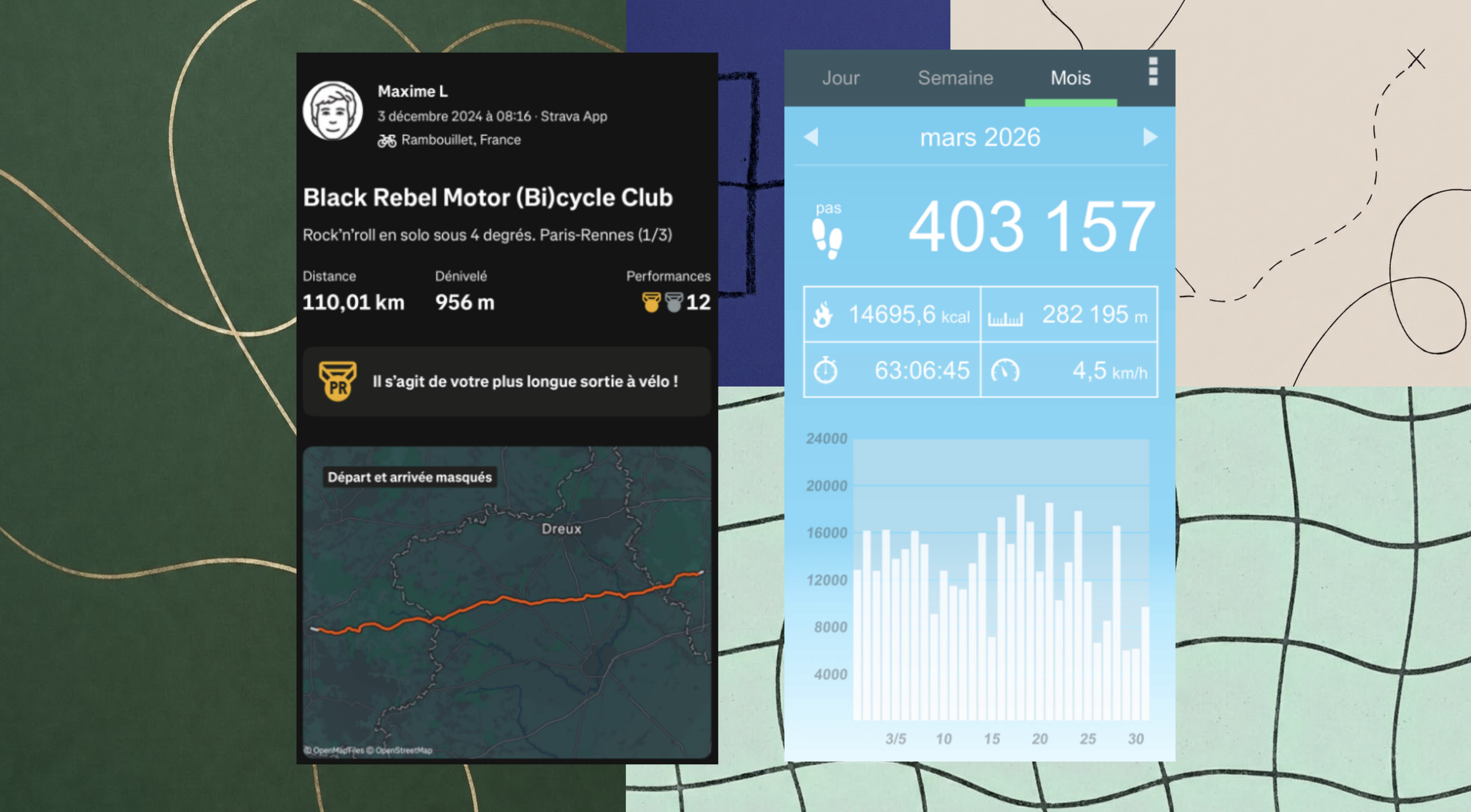
So the question wasn't how to replicate Strava by adding dogs to the interface. It was whether a walk could have its own measurement system. One that would analyze not performance, but routine and exploration.
That question became The Dog Walk Map.
I'm neither an engineer nor a developer. But with the rise of generative AI, I believe it's now possible to build a whole range of products for personal or professional use. As long as you master a few LLM basics, anyone with a bit of curiosity can create services, products, interfaces, internal tools, automations, data visualizations…
And that's exactly what The Dog Walk Map is about.
Who’s Walking Whom?
On paper, the product is fairly simple:
The user starts a walk
The phone records their location
The coordinates are connected on a map
And at the end, the app calculates a few metrics and saves the outing to a history.
But the most important technical choice was also a fundamental limit of the product. I asked myself one main question: should Hubert's micro-movements be included in the activity? If, for example, he wanders off to sniff a low wall and comes back to me, should those movements count in the data?
If so, friction would appear right away: I'd have to add a connected collar, a GPS tag, or a sensor on the animal. Since I didn't want to add complexity for the user, I decided that The Dog Walk Map would not track the dog, but the best sensor immediately available: the phone already in the pocket of the owner walking him. That gave me my foundation: the route would represent the owner's movement during a shared activity.
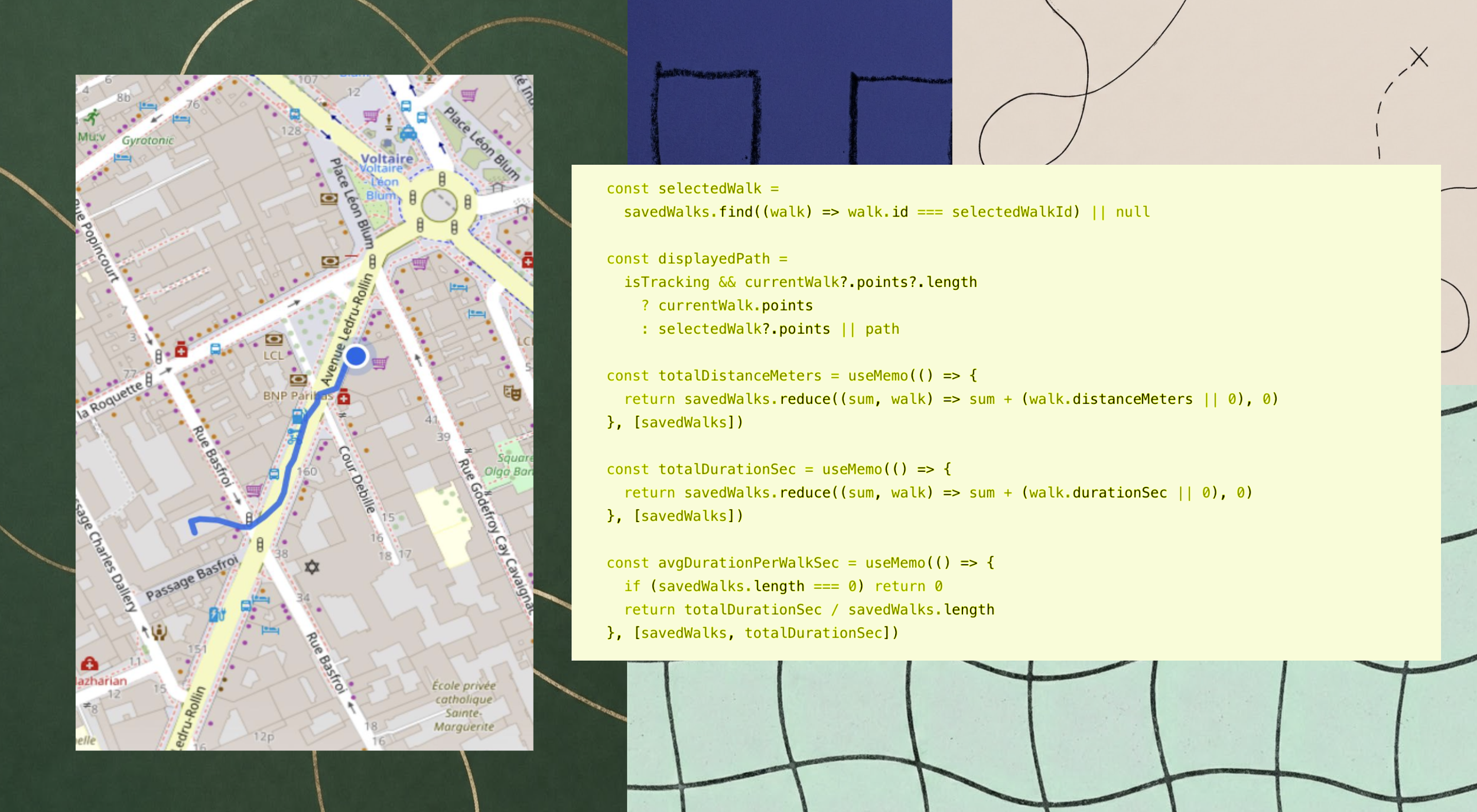
The Map and the Territory. © ML
I'm well aware that this product wouldn't precisely measure every movement the dog makes. But in most situations, this approximation is more than enough to meet the main need: knowing the route, duration, and distance of the walk.
The project was therefore built on a proxy logic: measuring a shared activity through the movement of the human accompanying it.
“Come on, let’s go!”
During the ideation phase, I immediately wanted to push the concept further. I imagined entering different dog breeds, weekly goals, route recommendations, comparisons between neighborhoods, or social features…
But I ultimately settled on a V1 designed to answer a much simpler question: can a walk become interesting when it can be retrieved later as a route and a few data points?
So I limited the prototype to a short loop:
Opening the app
Starting a new walk
Choosing the type of outing
Recording the movement
Ending the walk
Saving its route and key data
Being able to find the walk again in a logbook
Limiting the scope seemed essential to me, and it forced me to build a complete experience rather than a series of unfinished features. The app needed a beginning, an active state, and a clear end.
From Code to Route
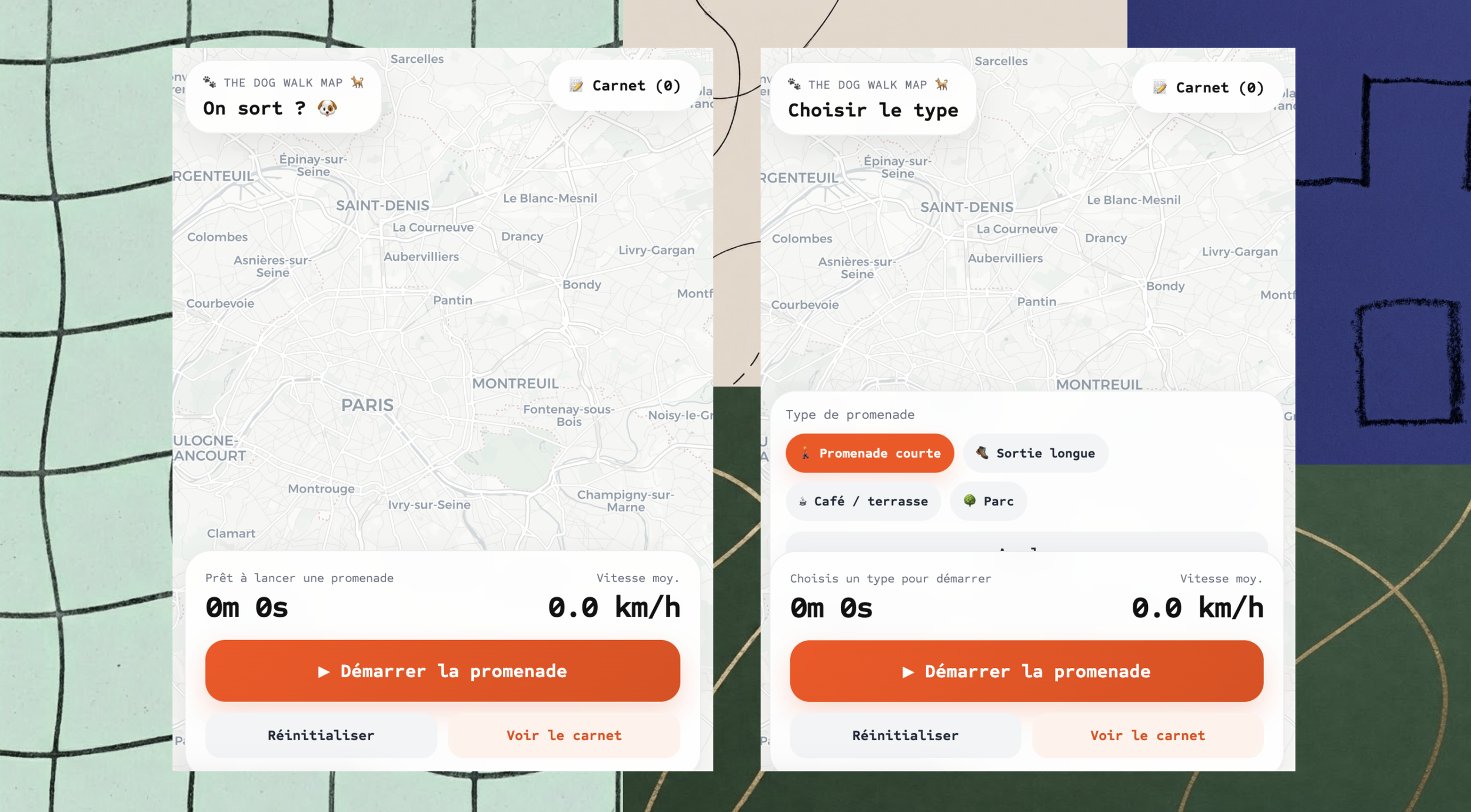
The interface had to be efficient and intuitive. The home screen rests on a simple principle: a map and a "Start the walk" button. Then, a choice of outing types.
In a first version, I had put the outing-type choice directly on the main screen. But it took up too much visual space for something that was only useful at the moment the walk actually started. So I moved it to the next step.
Let's take a walk on the wild side. © ML
The user sees the map first. After tapping "Start the walk," a selection card opens and lets them choose the type of walk: a short outing, a long outing, a café or terrace outing, or a park or woods outing.
Once the choice is made, recording begins.
This change seems modest, but it made the interface more readable. It also made it easier to tell the product's different states apart:
The app is ready
The user is preparing an outing
GPS tracking is active
The walk is over
The walk is saved
For a tracking product, these states matter more than interface decoration. Users must immediately understand whether the system is recording their location. Any ambiguity here would make all the data that follows hard to interpret.
Building the Prototype
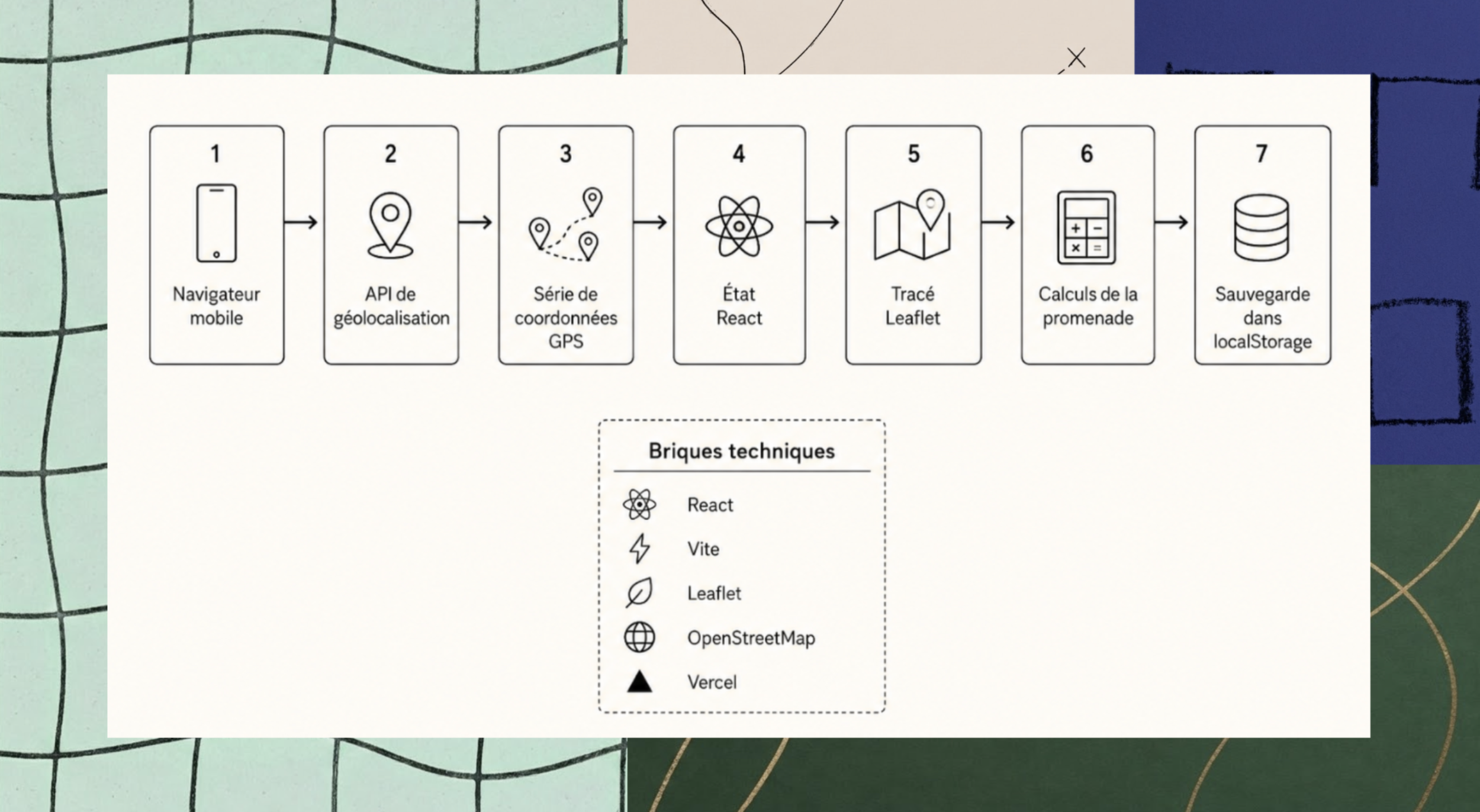
I built the app with React and Vite. The map uses Leaflet, with base maps from OpenStreetMap. The browser accesses the phone's location and regularly sends new coordinates.
Each new position is added to a chronological list of points. Leaflet then connects those points into a line on the map.
The system stores the following separately:
The owner's current position
The points already recorded
The walk's status
Information tied to the outing
Saved walks
I'll say it again: I'm not a developer, but AI helps steer anyone toward the right questions.
My starting point was therefore less the code than the information model. What should be shown? In what order? What is a finished walk? What data should be kept? What should happen when the user goes back to their history?
Here again, I used AI to speed up certain development steps: generating first functions, interpreting errors, fixing behaviors, and translating my product intentions into technical logic.
But AI couldn't decide the structure of the experience for me. I had to describe each behavior precisely, test the result, and understand why some changes worked while others broke things.
A Dotted-Line Walk
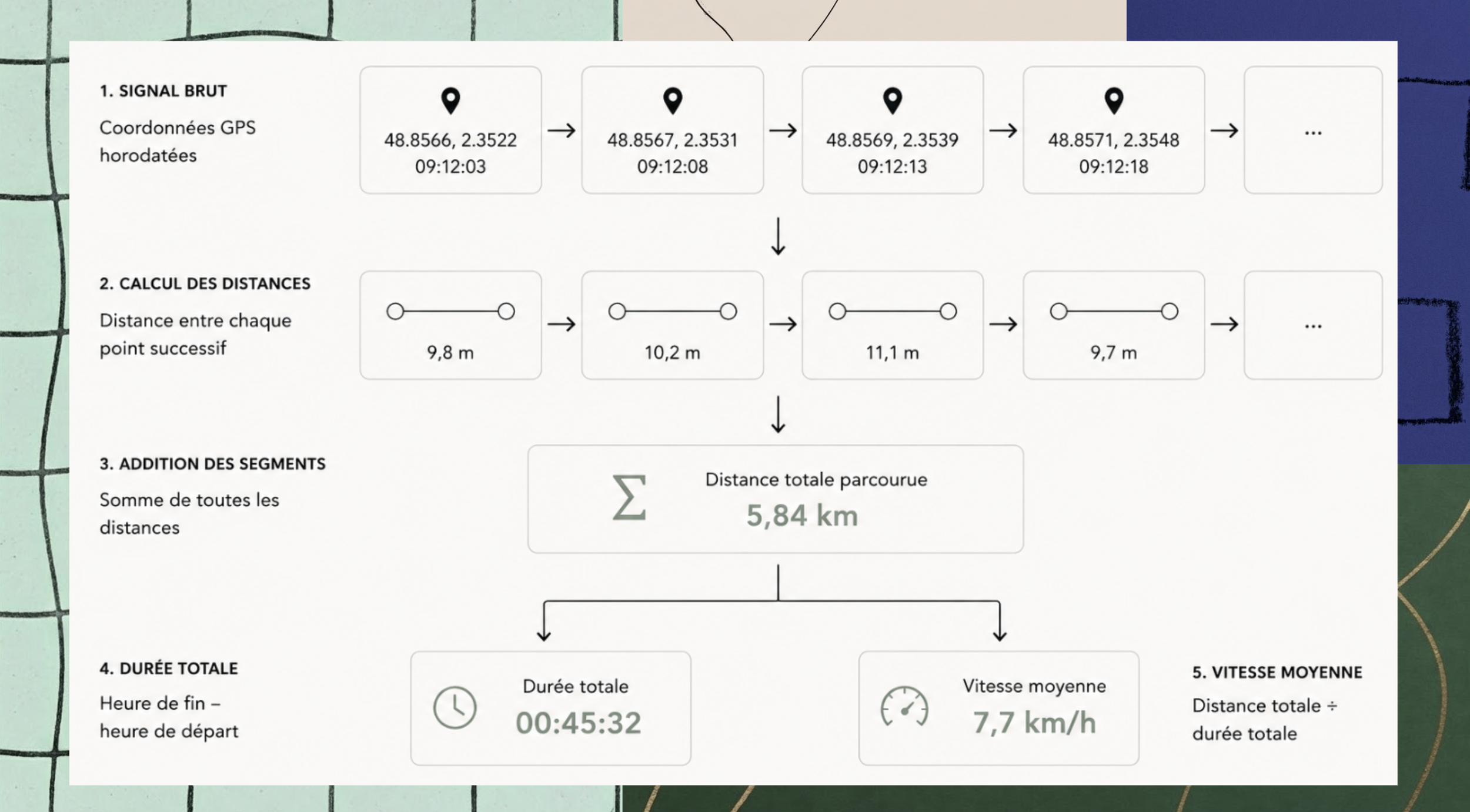
For the route, I built a sequence of GPS points ordered in time. To get the distance, the app calculates the length of the segment between two consecutive positions, then adds those segments up as the walk goes on.
Duration, for its part, relies on the start time and the end time. Additional metrics, like average speed, can then be derived from these base measurements.
Datadog ©
I realized the difficulty wasn't just in doing the calculations, but in the imperfect quality of the signal.
A phone's GPS can drift even while its owner stands still. In a city, buildings can also degrade accuracy. A single outlier point can create an artificially long segment and skew the distance.
This prototype doesn't include an advanced filtering or smoothing system like the ones in Strava or Uber.
That's one of its accepted limits. A more robust version would need to check the accuracy of each reading, ignore improbable movements, and filter out outliers before adding them to the route.
Building a Logbook Instead of an Isolated Map
As a reminder, the original goal was to save all the walks I took with Hubert so I could observe the different routes we took together. The idea was also to compare this data from one day to the next and improve the quality of our walks.
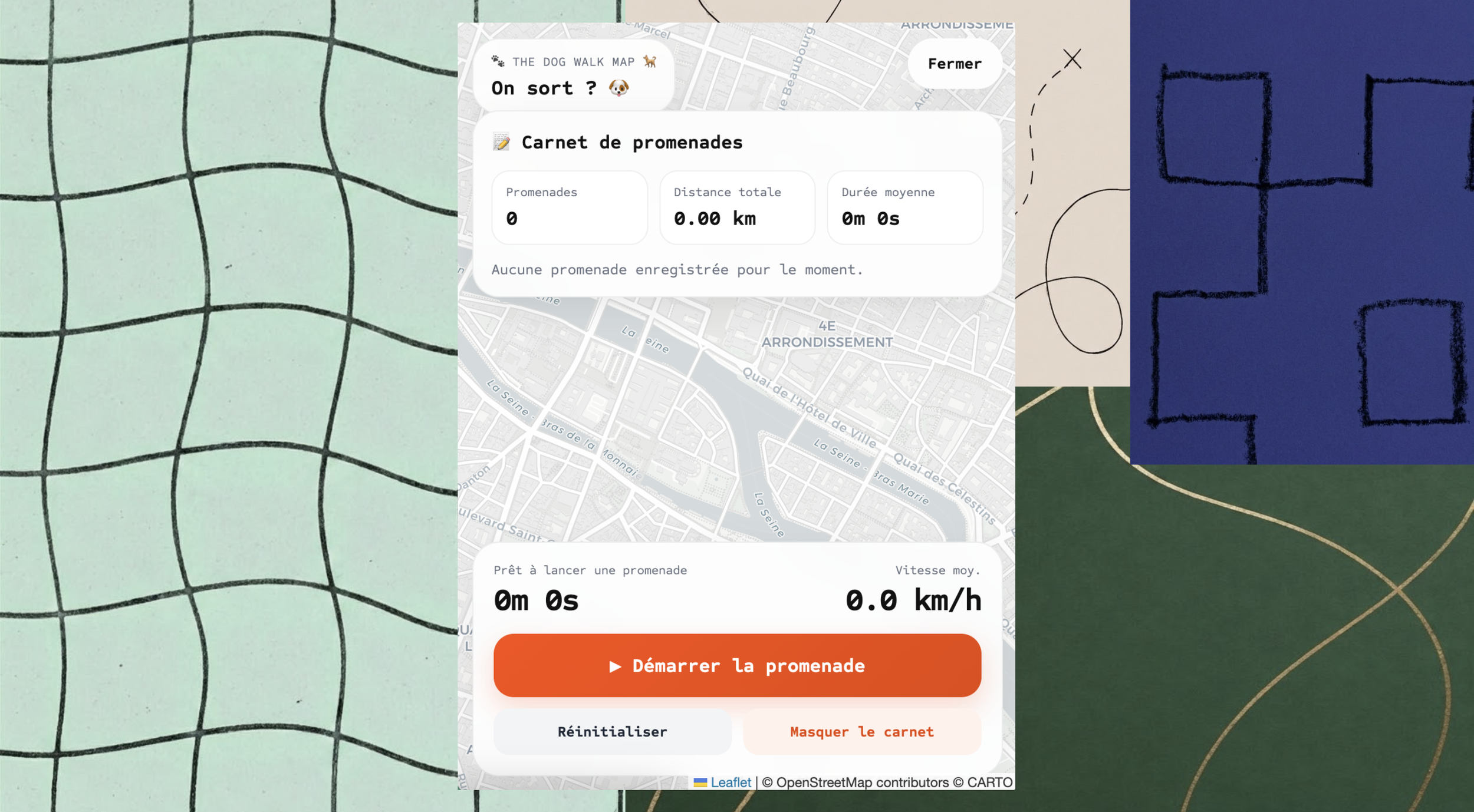
Yet the product has little value if every walk disappears when the page is closed. So I added the famous Walk Logbook.
The principle is simple: at the end of an outing, the route and its key information are saved in the browser's local storage. The user can then browse the list of their walks and reopen any of them on the map.
Who let the dog out ? © ML
This choice, admittedly the simpler one, let me avoid building an account system, a database, and remote infrastructure right away.
It made the prototype much more concrete: a walk was no longer just something you could watch live. It became part of a personal history.
This part required several fixes.
At one point, a walk appeared correctly in the list, but the button to view it didn't bring up the right route on the map. The problem didn't come from the map itself, but from how the selected walk was linked to the saved data.
It's a representative example of the real work on the prototype: an interface can seem to work while the continuity between its different states is still incomplete.
1 Walk = 1 Test
A geolocation tool can't be validated only from a computer sitting on a desk
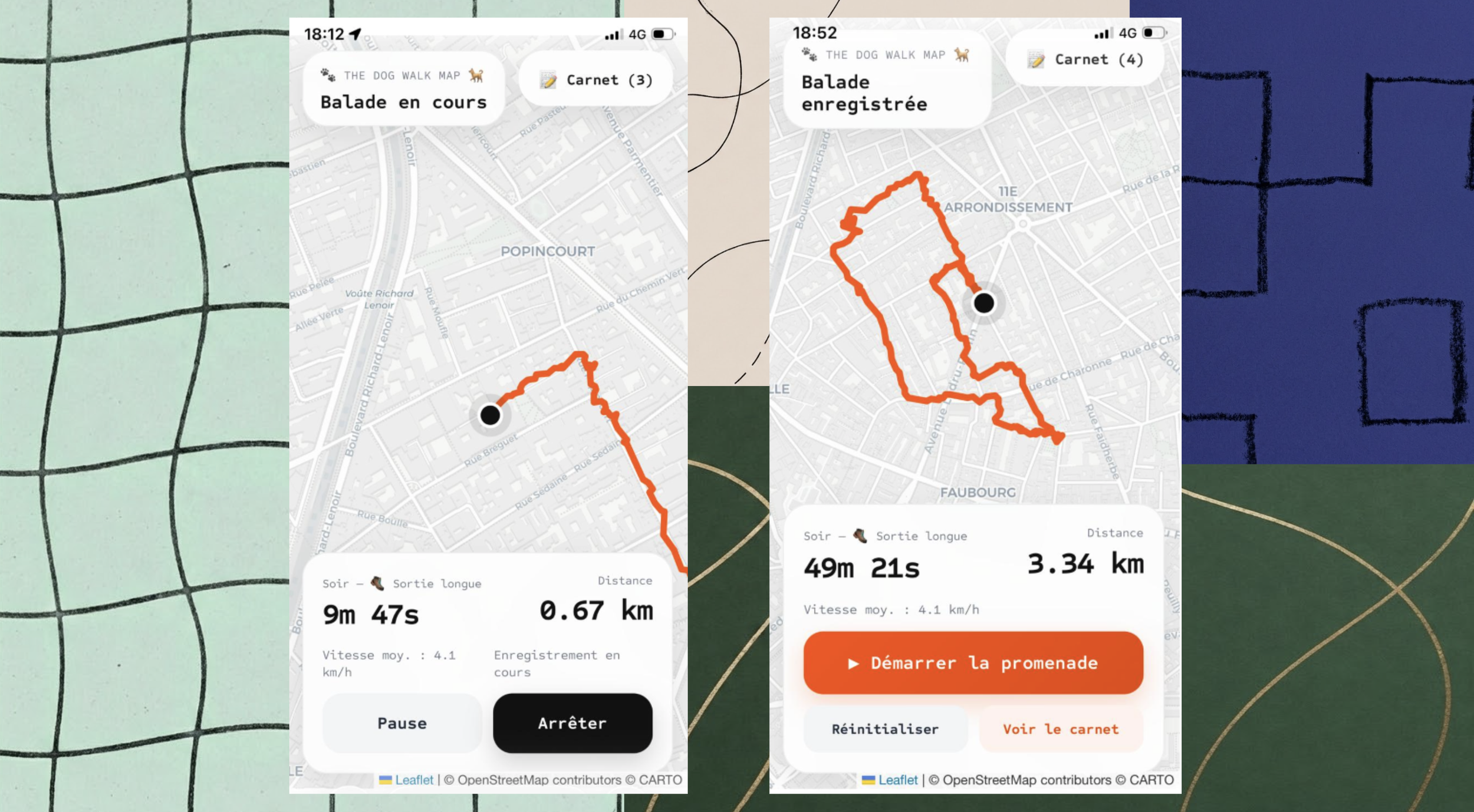
So I first ran the development server on my local network to open the app from my phone. Then I deployed the project on Vercel to get an HTTPS address accessible outside my Wi-Fi.
Where Data? © ML
This step was necessary because mobile browsers strictly control access to geolocation.
The first truly meaningful test therefore took place outside, in Paris's 11th arrondissement. It consisted of:
Opening the app on Safari
Allowing access to my location
Starting a walk
Walking
Watching the line build up on the map
Ending the outing
Checking that it showed up in the logbook
The prototype worked.
The Limits of the Product
Today, The Dog Walk Map turns my movements during a walk with Hubert into a record made up of a route, a duration, a distance, and a history.
However, it doesn't measure the dog's precise behavior (the back-and-forths, the energy expended…). It doesn't know which direction Hubert is looking. How many meters he actually covers. How much time he spends sniffing.
For that, you'd need a sensor worn directly by the animal.
My prototype has a much narrower, purely functional ambition: keeping a structured record of my dog's walks using my phone, which I'm already carrying.
The main limits identified so far:
Background web tracking remains fragile, especially when the iPhone is locked
The GPS data needs more filtering
Local storage doesn't let you find your walks on another device
The value of the history depends on how consistently it's used over time
In my view, these limits don't undermine the prototype itself. They define precisely how it can be used, and what it would take to go further in a possible V2.
End of the Route
To sum up, The Dog Walk Map was born from a very simple question: where did Hubert and I actually go during this walk?
To answer it, I had to translate an everyday activity into a series of explicit rules: when recording starts, what data is captured, how it's calculated, how it's stored, and what the interface can reasonably say about it.
I didn't build a finished product, or a system capable of tracking every one of Hubert's movements. With the help of generative AI, I built a first coherent answer to a concrete need: turning a shared walk, usually fleeting, into a trace you can find, review, and compare.
So, after all this, one question remains open.
Is Hubert happier today?
I don't know. But I am.